How does HTTPS keep you safe? HTTPS encrypts all data traveling between your browser and a website, making it unreadable to anyone who intercepts the traffic. When you enter a password or credit card number on an HTTPS site, that information is scrambled before transmission and can only be decoded by the intended recipient. Without HTTPS, your data travels in plain text that anyone on the same network can potentially read.
The “S” in HTTPS stands for “Secure.” While HTTP (without the S) transmits data openly, HTTPS wraps everything in a layer of encryption using a protocol called TLS (Transport Layer Security). This protection is why your browser shows a padlock icon for HTTPS sites and may warn you about sites that still use plain HTTP.
How Encryption Works in HTTPS
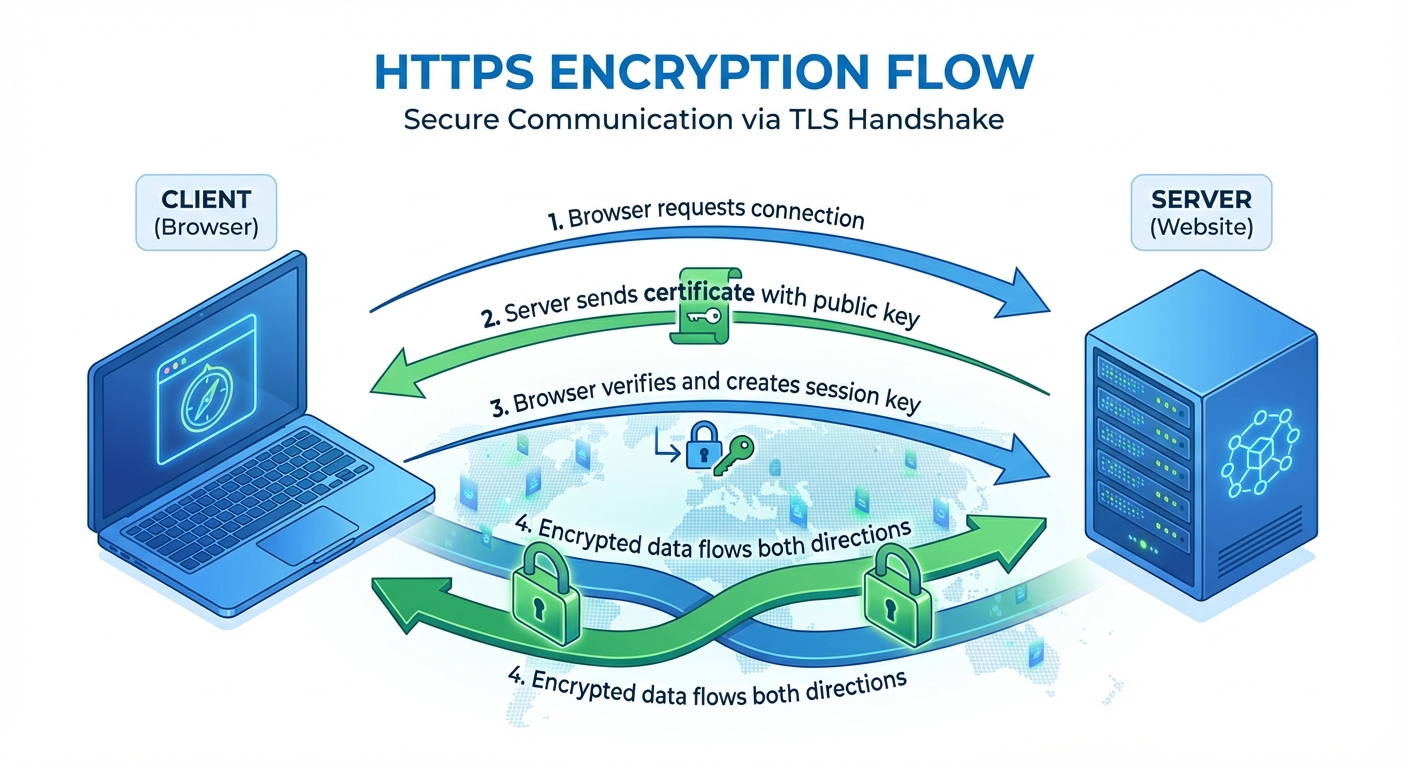
When you connect to an HTTPS website, your browser and the server perform a “handshake” to establish a secure connection. During this exchange, they agree on encryption methods and exchange special keys used to encode and decode messages.
The magic lies in public key cryptography. The website has a public key that anyone can use to encrypt messages to it, but only the website’s private key can decrypt those messages. Imagine a mailbox where anyone can deposit letters through the slot, but only the owner has the key to open the box. Your browser uses the website’s public key to encrypt your data, ensuring only the intended recipient can read it.
After the initial handshake, both sides generate a shared session key for faster encryption during your visit. Every piece of data traveling between you and the site, including URLs, form submissions, cookies, and page content, is encrypted with this key. Even if someone captures the traffic, they see only meaningless scrambled data.
What HTTPS Protects Against
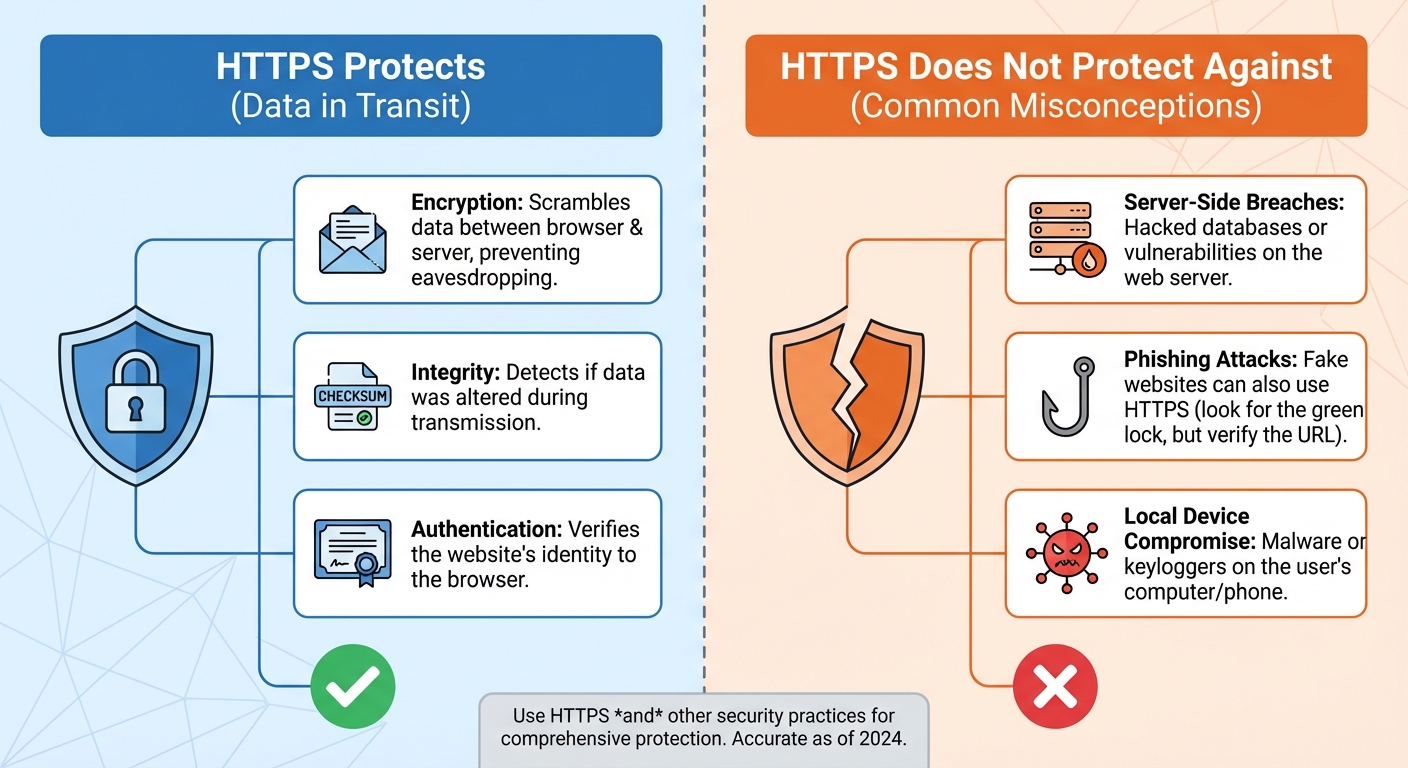
HTTPS defends against several types of attacks that exploit unencrypted connections. The most common threat is eavesdropping. On public WiFi networks, coffee shops, airports, or hotels, other devices on the network can potentially see unencrypted traffic. Without HTTPS, they could capture your passwords, read your emails, and see every website you visit.
Man-in-the-middle attacks go further than passive eavesdropping. An attacker positioned between you and a website can not only read unencrypted traffic but modify it. They could inject malicious code into web pages, redirect form submissions to their own servers, or alter information you’re trying to send. HTTPS prevents this because the attacker cannot decrypt the traffic to modify it or re-encrypt it properly.
HTTPS also provides authentication. The certificate that enables HTTPS is issued by a trusted Certificate Authority that verifies the website’s identity. When you see the padlock icon, you know you’re connected to the real website, not an impostor. This protection helps prevent phishing attacks that create lookalike sites.
What HTTPS Doesn’t Protect
Understanding HTTPS limitations is as important as knowing its benefits. HTTPS protects data in transit between your device and the website. It does not protect data stored on your device, data stored on the website’s servers, or what happens after you transmit information.
If a website has a data breach, HTTPS won’t help because the data was compromised at rest, not in transit. If your computer has malware, attackers can capture information before it’s encrypted for transmission. HTTPS also doesn’t guarantee a website is legitimate or trustworthy, only that your connection to it is encrypted. A phishing site can have valid HTTPS.
HTTPS also doesn’t hide which websites you visit from your internet service provider or network administrator. They can see that you connected to example.com, though they cannot see specific pages you visited or data you exchanged. For browsing privacy, you would need a VPN, which encrypts traffic between your device and the VPN server.
How to Verify HTTPS Protection
Modern browsers make it easy to verify you’re on a secure connection. Look for the padlock icon in the address bar, typically to the left of the URL. Clicking this icon reveals certificate details and confirms the connection is encrypted.
The URL itself should start with “https://” rather than “http://”. Most browsers now hide the protocol, but clicking the address bar reveals it. Some browsers show a “Not Secure” warning for HTTP sites, especially when you’re entering passwords or payment information.
You can click the padlock to view the site’s security certificate. The certificate shows who issued it, when it expires, and what domain it covers. Most users don’t need to examine certificate details, but checking can help if something seems suspicious.
Why HTTPS Matters More Than Ever
HTTPS was once reserved for login pages and payment forms, with the rest of websites served over plain HTTP. Today, HTTPS is effectively mandatory for any serious website. Search engines penalize HTTP sites in rankings. Browsers show prominent warnings when users enter any data on HTTP pages. Many modern web features simply don’t work without HTTPS.
This shift happened because security researchers demonstrated how easily HTTP traffic could be exploited. Tools that capture WiFi traffic and extract passwords became widely available. The only solution was encrypting everything, not just the sensitive parts. Organizations like Let’s Encrypt made HTTPS certificates free and easy to obtain, removing cost as a barrier.
As a user, you should expect HTTPS everywhere you browse. Be suspicious of any site that asks for personal information over HTTP. Browser warnings about insecure connections should be taken seriously, not clicked through habitually.
Summary
HTTPS encrypts all data between your browser and websites using TLS, preventing eavesdroppers from reading your sensitive information. It protects against both passive traffic capture and active man-in-the-middle attacks while also verifying website identity through certificates.
HTTPS does not protect data stored on servers, your device, or hide which sites you visit from your ISP. Look for the padlock icon and “https://” in your address bar to verify protection. Any legitimate website handling personal information should use HTTPS, and browsers increasingly warn against those that don’t.