What’s the secret to getting better answers from ChatGPT? Be specific about what you want. Vague prompts get vague answers. When you tell ChatGPT exactly who to be, what to do, and how to format the response, you get dramatically better results. The difference between a mediocre prompt and a great one is often just 20-30 additional words of context.
Most people type a question like they’d type into Google: short, keyword-focused, minimal context. ChatGPT works differently. It performs best when you treat it like a knowledgeable assistant who needs proper instructions. Here’s how to get consistently useful responses.
The PTCF Framework
The most reliable way to write effective prompts uses four elements: Persona, Task, Context, and Format. Not every prompt needs all four, but complex requests benefit from including each one.
Persona tells ChatGPT what role to play. “Act as a financial advisor,” “You are an experienced Python developer,” or “Respond as if you’re a high school teacher explaining this to a 16-year-old.” The persona shapes the vocabulary, tone, and assumptions in the response.
Task explains exactly what you want done. “Write,” “summarize,” “analyze,” “compare,” “brainstorm,” “debug,” or “explain” are common task verbs. Be specific about the scope: “Write a 300-word product description” beats “Write about this product.”
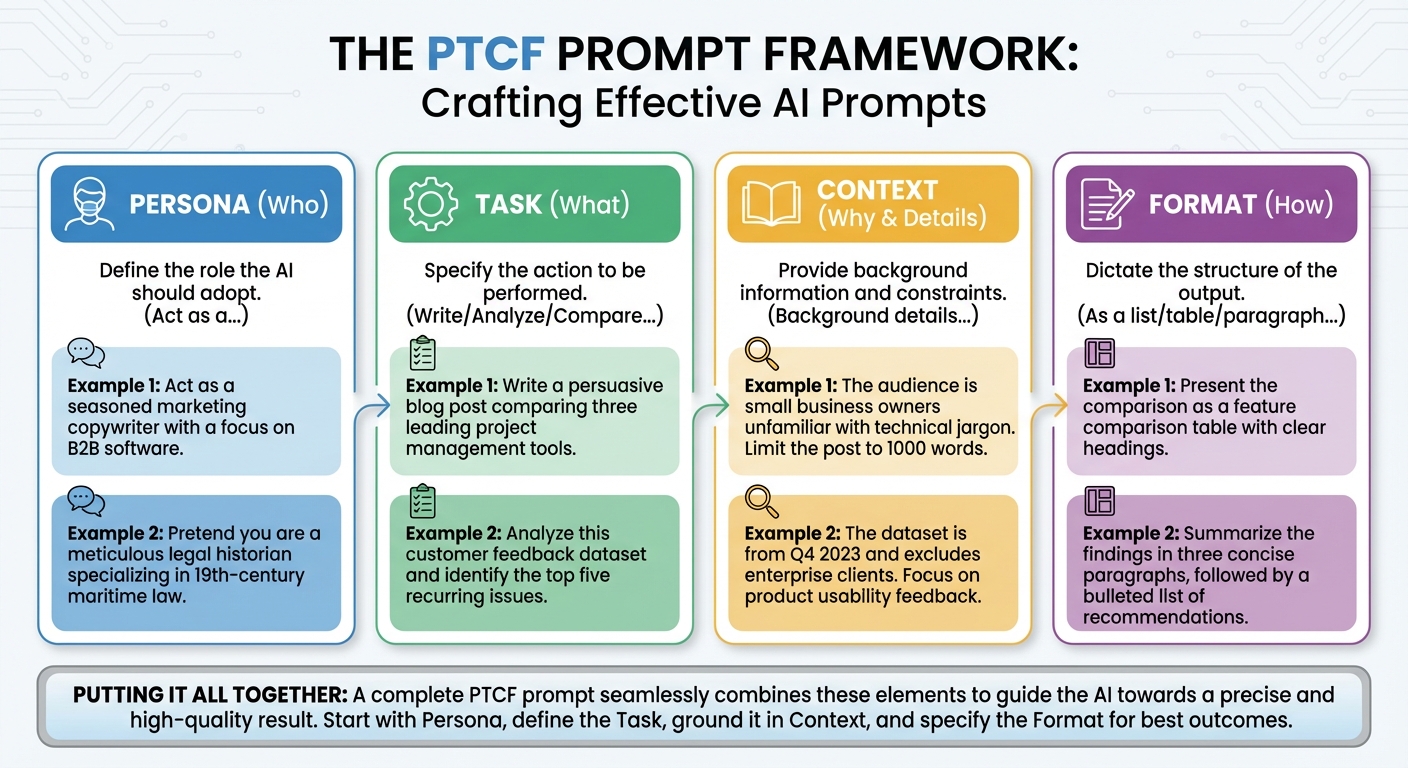
Context provides background information ChatGPT needs. Include relevant details, constraints, or goals. “I’m writing for an audience of small business owners” or “This is for a beginner who has never coded before” shapes the response appropriately.
Format specifies how you want the output structured. “Give me a bulleted list,” “Write this as a table comparing three options,” “Keep it under 200 words,” or “Structure this as an outline with headers.” Format instructions prevent getting a wall of text when you wanted something scannable.
Ask ChatGPT to Ask Questions First
One simple line transforms most interactions: “Before you start, ask me any questions you need so I can give you more context.” This single addition reduces guesswork dramatically.
Instead of ChatGPT making assumptions about what you want, it’ll ask clarifying questions. For a request like “Help me write an email to my boss,” ChatGPT might ask about the email’s purpose, your relationship with your boss, the tone you want, and any specific points to include.
This approach works especially well for creative tasks, complex projects, and anything where the right answer depends on details you might not think to include. Let ChatGPT’s questions surface those details.
Layer Instructions for Complex Tasks
Don’t try to get everything in one prompt. Complex tasks work better when you build them up across multiple exchanges.
Start broad: “I want to write a business plan for a coffee shop. Let’s start with an outline of what sections it should include.”
Then refine: “Great. Now expand section 3, the market analysis, into a full draft.”
Then polish: “Rewrite the market analysis to sound more confident and use specific data points.”
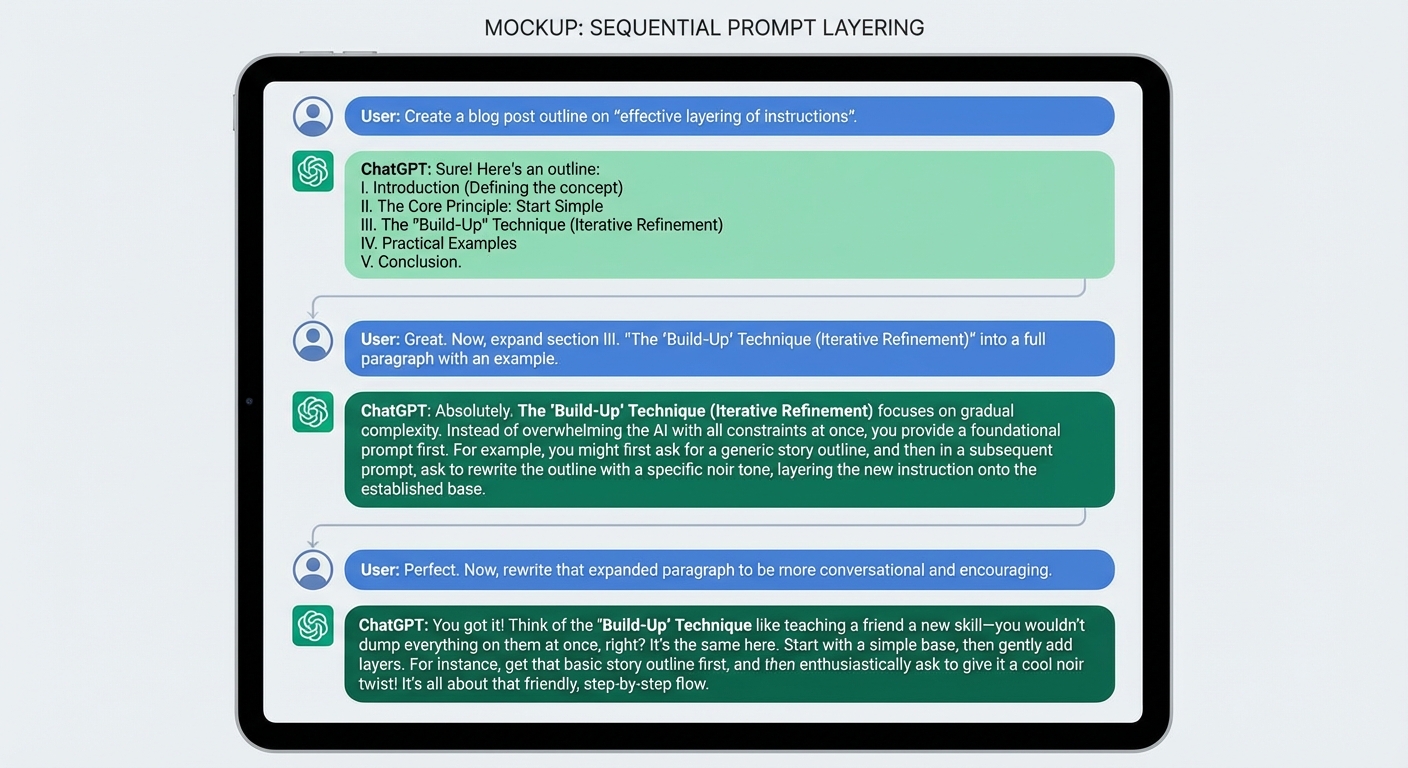
This iterative approach gives you chances to course-correct. If ChatGPT goes in the wrong direction after the outline, you can redirect before investing effort in a full draft. It also keeps individual prompts manageable rather than creating one enormous instruction set.
Use Examples When Possible
If you have a specific style or format in mind, show ChatGPT what you want. “Write a product description similar to this: [paste example]” works better than trying to describe the style you want.
Examples clarify expectations in ways that descriptions often can’t. If you want a response that’s “professional but friendly,” different people imagine different things. If you provide an example of professional-but-friendly writing, there’s no ambiguity.
This technique works for email tones, writing styles, data formats, code structures, and anything where “I know it when I see it” applies. One good example often beats a paragraph of description.
Use the Poke Holes Method
Instead of asking ChatGPT to create something from scratch, give it something you’ve already written and ask it to criticize. “Here’s my resume. What are the three biggest weaknesses?” or “Review this email and point out anything that might be unclear or offensive.”
The “poke holes” approach uses ChatGPT as an editor rather than a writer. It stress-tests your work by finding problems you might have missed. This often produces more valuable output than asking ChatGPT to write something from scratch, because it builds on your knowledge and voice while applying AI analysis.
Know When to Start Fresh
ChatGPT maintains context within a conversation, which is usually helpful. But after extensive back-and-forth, the accumulated context can start causing problems. Earlier instructions might conflict with later ones. The AI might get “stuck” in patterns from earlier in the conversation.
If responses are getting worse or seem disconnected from your current request, start a new chat. You lose the conversation history but get a fresh start without accumulated confusion. For long projects, this might mean starting a new chat daily or whenever you shift to a substantially different task.
Common Mistakes to Avoid
Being too vague: “Help me with my resume” gives ChatGPT nothing to work with. “Review my resume for a software engineering position and suggest improvements to make it more ATS-friendly” provides direction.
Accepting the first response: Iterate. Ask follow-up questions. Request changes. The first response is a starting point, not a final answer.
Not providing feedback: If something’s wrong, say so specifically. “The tone is too formal” or “This is too long” helps ChatGPT adjust. Just saying “try again” doesn’t give useful information.
Forgetting format requests: If you want a list, say so. If you want something short, specify a word count. Don’t assume ChatGPT knows your preferences.
Summary
Effective ChatGPT use comes down to clear communication. Use the PTCF framework (Persona, Task, Context, Format) for complex requests. Ask ChatGPT to ask questions before starting. Layer instructions across multiple prompts for complicated projects. Provide examples when you have a specific style in mind.
The biggest improvement most people can make is simply being more specific. Twenty extra words of context in your prompt can save multiple rounds of back-and-forth trying to get the response you actually wanted. Treat ChatGPT like a capable assistant who needs good instructions, not a mind reader who should guess what you mean.